
Build or buy
Build your product. Let UserReason handle the surveys.
You can build a feedback form. The bigger decision is whether you want to keep building the system around it. UserReason gives you managed in-app surveys, targeting, follow-ups and response review—with 10,000 free monthly responses per workspace.
By UserReason · Updated · Read as Markdown
For a small product team, we would start with UserReason
As a technical founder, you already have a product to build. Feedback should help you decide what to ship next, without becoming another feature backlog of its own. Our recommendation: use UserReason when you want to keep asking useful questions as your product changes.
Start with one moment: a user pauses setup, tries a new feature or schedules a cancellation. Connect that action to a survey. Once the event is in place, you can change the questions, follow-ups and delivery rules in UserReason without rebuilding the form each time.
- Use the SDK to bring the survey into your app instead of designing a new feedback interface for every question.
- Manage drafts and review responses through the dashboard, CLI or MCP, depending on how you work.
- Start on the Free plan with 10,000 monthly responses per workspace, giving you room to collect feedback beyond a small proof of concept.
- Start with the onboarding feedback recipe →
A question worth asking, conditional follow-ups and a complete definition to adapt.
The form is the beginning of the work
The first version may be a textarea and a POST request. Then you want a follow-up for one answer, a different audience for another question, partial responses from people who stop midway, and a way to avoid asking the same person repeatedly. Each request is reasonable. Together they become a survey system.
You also need somewhere to read the answers. A database row is useful storage; a recurring feedback workflow needs a way to review responses, compare questions and decide what to investigate. That is the work UserReason takes on as a product, so your team can spend its attention on the feedback itself.
This matters especially when you are working alone or with a small engineering team. Every change to a homegrown survey competes with the customer-facing work you originally wanted the feedback to guide.
What you keep off your own roadmap
Scroll horizontally to see all columns.
| When you need to… | With UserReason | With a homegrown form |
|---|---|---|
| Change a question or add a follow-up | Edit a managed survey, review the draft and publish. | Change application code or build a configurable survey definition. |
| Ask after a specific action | Connect your app event and configure the survey’s delivery rules. | Connect the event, implement eligibility and maintain the display logic. |
| Keep the first answer if someone stops | Enable partial responses; the SDK handles intermediate saves. | Build checkpoint requests, stable response IDs and retry/update rules. |
| Control who sees the survey and how often | Use managed targeting and frequency rules with your chosen identity setup. | Maintain audience checks, identity handling and repeat suppression. |
| Read and act on the answers | Use the dashboard or retrieve responses through the CLI/MCP workflow. | Build or connect the queries, access controls and review interface. |
| Ask your coding agent to help | Give it scoped access to existing survey and response tools. | Expose and maintain the operations your agent needs. |
You still own the product event, your identity and consent choices, and the decision you make from the answers. UserReason supplies the survey workflow around those choices.
- See UserReason targeting and frequency →
Control the audience and delivery rules.
- See how partial responses work →
Keep saved answers when someone does not finish the survey.
Keep feedback close to the way you build
If you work from your editor with a coding agent, your feedback workflow can start there too. Ask the agent to help with installation, prepare a survey for a specific product moment, and bring back the draft for your review. Later, ask it to retrieve responses and explain the patterns with supporting answers.
Read https://docs.userreason.com/llms.txt. Help me add UserReason to this app, then draft a survey for users who explicitly pause onboarding. Ask what made them pause and add an optional follow-up for people who need information or hit a problem. Show me the draft and its targeting before publishing. After we collect responses, summarize the recurring issues with supporting answers.The dashboard remains available for reviewing and changing the survey. You do not need to build an agent interface on top of your own response database before trying this workflow.
- Set up UserReason with your coding agent →
Installation, scoped CLI/MCP access and draft review.
Start with 10,000 free monthly responses
A small team should be able to start collecting useful feedback before committing to a survey subscription. UserReason includes 10,000 responses per workspace each month on the Free plan. That gives you room to try onboarding, cancellation and feature-feedback surveys in the same workspace.
The allowance resets at the start of each calendar month in UTC. A response counts once when its first answer is saved; later answers do not count again. At the limit, no new responses are recorded. Enterprise is custom-priced for more than 10,000 monthly responses.
An owned form may fit within infrastructure you already pay for. The comparison is therefore your own combination of engineering time, upkeep and service spend—not a claim that every custom form costs more.
- See the Free plan and Enterprise options →
Current allowance, counting rules and custom capacity above 10,000 responses.
See the difference in a working example
Try one onboarding question three ways: an owned form, UserReason’s native survey and a PostHog native popover. Each asks what made someone pause setup, with an optional follow-up for people who need more information, encountered a problem or chose “Something else”.
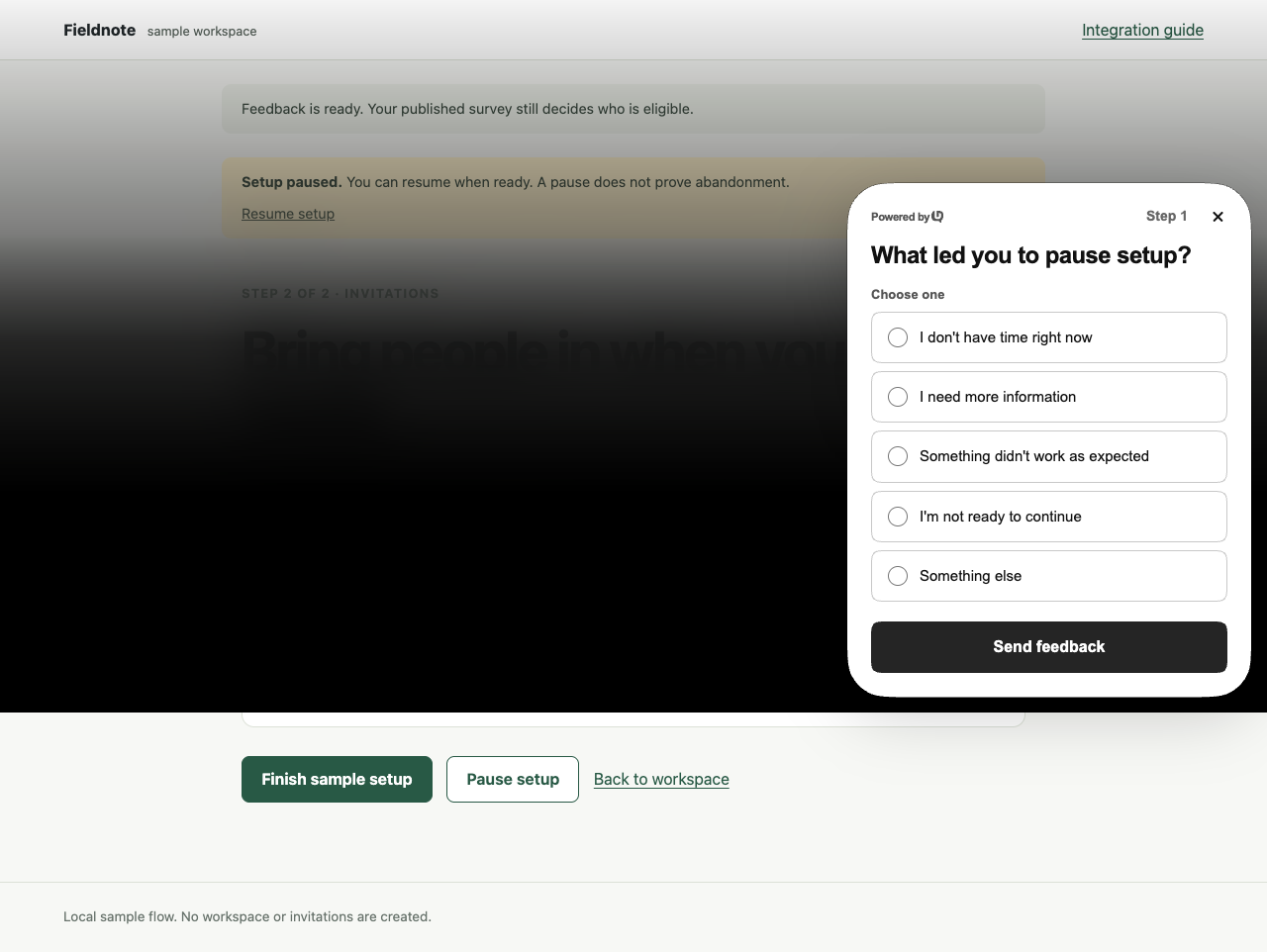
- Download the working feedback comparison →
Run an owned form, UserReason and PostHog against local fixtures. Public SDKs, source, a lockfile and browser tests are included.
unzip feedback-comparison.zip
cd feedback-comparison
npm ci
npm run build
npm test
npm run dev
The example runs locally and requires an installed Chrome browser for its tests. No vendor account or credentials are needed. The owned form includes a validating endpoint, first-answer saves and retry handling, so you can inspect the work involved. The server fixtures and response store are temporary; use the integration guide to connect a real UserReason site.
- Connect UserReason in Next.js →
Go from the example to a live integration and a saved response.
- Using React? Start here →
A tested Vite example with a real product-action boundary.
When we would still build a form
A single, stable question can be a sensible addition to an existing authenticated endpoint, database and internal tool. If the interface is central to your product or your storage requirements demand a fully owned implementation, building can also be the right choice.
The decision changes when questions, audiences and follow-ups become recurring work. That is where we would choose UserReason: keep the product-specific event in your app and let a dedicated service handle the survey workflow.
- Start collecting feedback with UserReason →
Create your workspace, connect your app and start with 10,000 free monthly responses.
- Already considering PostHog Surveys? →
Compare the feedback workflow and free response allowances.
Sources and example methodology
Published by UserReason. Product documentation and pricing checked on 18 October 2026. We recommend UserReason for the feedback workflows described here; the comparison also identifies cases where an owned form or PostHog is a better fit.
The downloadable example pins @userreason/js 0.5.0, posthog-js 1.438.12, Vite 7.3.7 and TypeScript 7.0.2. Tests cover all five answer routes in each implementation, optional answers, partial and final saves under one ID, and the common application audience and repeat guards. They use the actual public SDKs with local server fixtures, not live vendor accounts.
The example does not test vendor ingestion, billing, exports, permissions or cross-session identity. Its application guards do not prove server-side targeting. PostHog uses a full local bundle with bot filtering disabled for automated tests; keep normal filtering in a real project. No performance, implementation-time or conversion-lift comparison is claimed.
- Example checksum and file manifest →
Verify the download. Its README documents the setup, test scope and steps for moving to a real development project.
- How the example is tested →
Inspect the answer-route checks, failure handling and verification record.