
Framework guides
Add in-app surveys to React
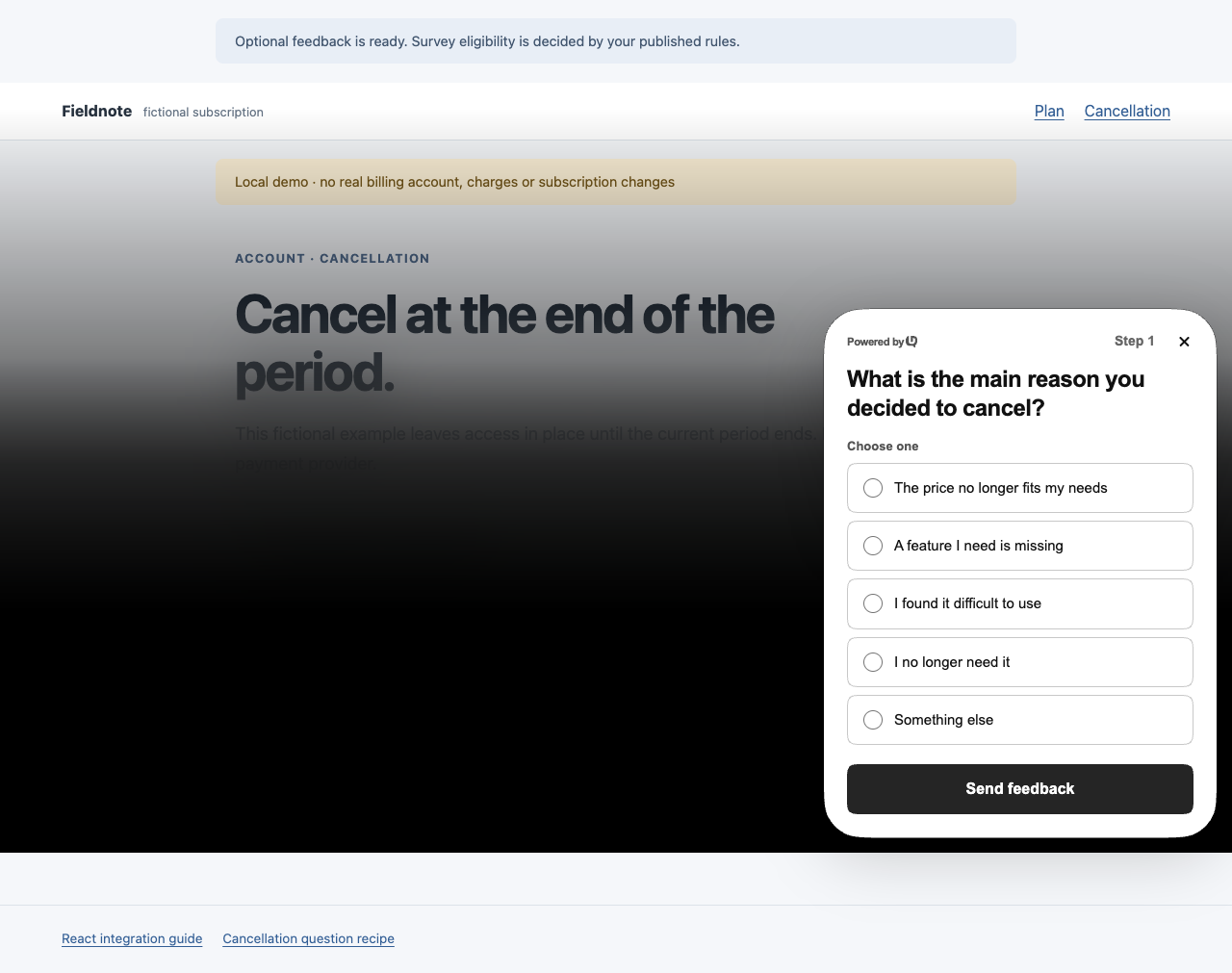
Initialize UserReason once in a browser provider, then report an application event after the relevant action succeeds. This React example offers optional feedback after a local backend confirms that cancellation is scheduled. Feedback does not decide whether cancellation goes through.
Updated · Read as Markdown
A cancellation flow with a separate feedback step
The app shows a fictional Starter subscription, a cancellation view and a confirmed scheduled state. Its local demo API accepts the cancellation before the app reports subscription_cancellation_scheduled to UserReason. The published survey can then ask for a reason.
The download is an integration example, not a billing integration. Its local backend does not cancel a real subscription, charge a card or manage customer access. Replace that demo operation with your own authenticated billing workflow before using this pattern in a product.
- Download the React cancellation example →
Vite app, local demo API, event definition and survey recipe.
- Choose useful cancellation questions →
Timing, neutral wording and interpretation for this feedback moment.
Run the example and connect a test site
Use the download’s package-lock.json for its exact React, Vite and TypeScript versions. It uses the public @userreason/js 0.5.0 package and keeps the SDK disabled while the public site ID is empty or invalid.
Scroll horizontally to see all columns.
| Example dependency | Pinned version or requirement |
|---|---|
| UserReason browser SDK | @userreason/js 0.5.0 |
| React and React DOM | 19.3.1 |
| Vite | 7.3.7 |
| Vite React plugin | 5.1.4 |
| TypeScript | 7.0.2 |
| Node.js | 22.12 or newer |
| Public CLI used by this guide | @userreason/cli 0.1.1 |
| Guide and recipe review | 18 October 2026 |
unzip react-cancellation.zip
cd react-cancellation
npm ci
cp .env.example .env.local
npm run dev
Scroll horizontally to see all columns.
| Environment variable | Value |
|---|---|
| VITE_USERREASON_SITE_ID | The public UUID of a dedicated UserReason test site. |
| VITE_USERREASON_API_BASE_URL | Optional API origin. Leave empty for https://api.userreason.com. |
Vite exposes VITE_ values to browser code. Put only the public site ID and intended API origin here; keep management credentials, billing secrets and database URLs on your server. Restart Vite after changing .env.local.
Use the same environment for your site, CLI and SDK. A site created through dash-dev.userreason.com needs https://api-dev.userreason.com and the CLI’s --dev option. If the site restricts origins, allow the exact local origin printed by the development server.
The download includes its own browser test. After installing Google Chrome, run the commands below to type-check, build and exercise the synthetic cancellation and survey paths. The README also describes the optional Chromium setup. These tests use local fixtures and do not cancel a real subscription or write customer responses.
npm run typecheck
npm run build
npm test- Create a site and connect UserReason →
Account, site and public SDK setup.
- Vite environment variables →
How Vite loads and exposes public configuration.
Give the SDK one owner in the React tree
The root provider in src/feedback.tsx owns the shared SDK instance. Its effect initializes UserReason, observes readiness and errors, and removes its listener and destroys the instance on cleanup. Keep that provider above the billing and cancellation views instead of initializing again in every component.
useEffect(() => {
  if (!configured) return;
  let active = true;
  let unsubscribe = () => {};
  try {
    userreason.init({
      siteId,
      storage: 'memory',
      automaticTriggers: false,
      ...(apiBaseUrl ? { apiBaseUrl } : {}),
    });
    unsubscribe = userreason.on(event => {
      if (active && event.type === 'error') setStatus('unavailable');
    });
    void userreason.ready().then(
      () => { if (active) setStatus('ready'); },
      () => { if (active) setStatus('unavailable'); },
    );
  } catch {
    setStatus('unavailable');
  }
  return () => {
    active = false;
    unsubscribe();
    userreason.destroy();
  };
}, []);
This excerpt belongs inside the downloaded FeedbackProvider, which supplies the public configuration and status state. Import and reuse that provider rather than mounting a second SDK initializer. The effect runs in the browser; rendering this component on a server does not initialize a visitor’s browser.
React Strict Mode can exercise an extra setup and cleanup cycle during development. Keeping initialization and teardown together lets the provider handle that cycle and ordinary view changes. Do not use reset() for navigation; it establishes a new visitor identity and belongs at sign-out, not routine view changes.
This sample uses memory storage and automaticTriggers: false. Explicit event() calls still work, while automatic page-load, selector and delay observers are disabled. Memory storage avoids persistent visitor state on the device; it still permits network requests and storage of submitted answers by UserReason. Choose production storage and consent behavior for your own application.
- SDK initialization and cleanup →
The shared instance, ready(), destroy() and supported options.
- React effect lifecycle →
Setup, cleanup and development behavior.
- Storage and consent →
What memory, local and cookie storage mean.
- Identity and sign-out →
Add identity only when needed and clear it at the right boundary.
If your app needs signed-in survey targeting
The downloadable example stays anonymous. A signed-in application can add identity as a separate integration, using its own authentication system. This optional adaptation is not part of the sample’s browser test.
userreason.init({ siteId, waitForIdentity: true });Resolve your application’s session independently, then identify the account using a stable ID from that session. Do not await ready() before resolving authentication when waitForIdentity is true: readiness is waiting for identify(). In the following excerpt, account is the authenticated account returned by your own application.
userreason.identify(account.id);
await userreason.ready();
When switching directly to another signed-in account, call identify() with that account’s stable ID. On sign-out, call reset() to clear the prior identity; waitForIdentity mode then waits for the next identity. Use destroy() for provider teardown, not as a substitute for sign-out. Browser identity values remain unverified unless you add a supported backend assertion.
- Identity, session restoration and account switching →
Follow the current identity contract for your authentication flow.
Emit the event after the backend confirms scheduling
Opening the cancellation view shows intent. Pressing its confirmation button starts a request. src/demo-api.ts calls the local POST /api/demo/subscription/cancel endpoint and requires a successful response with demo: true, cancel_at_period_end: true and plan_tier: starter. src/App.tsx enters its Cancellation scheduled state before an effect attempts optional feedback.
void userreason.event('subscription_cancellation_scheduled', {
  flow_version: 'react-cancellation-v1',
  plan_tier: 'starter',
}).catch(() => setStatus('unavailable'));
Keep the success check in your application’s cancellation handler. A failed request, opening the view or leaving the page must not emit this event. Cancellation scheduling is also different from the subscription actually ending at the end of its paid period.
The event contains two fixed categories. It sends no account ID, billing identifier, email, form value or page URL. Waiting for your own backend confirmation improves the meaning of the event, but a browser-reported value still does not establish trusted billing or identity facts in UserReason.
A true event() result means a matching survey was mounted; false means none mounted. Neither result is a billing confirmation or proof that an answer was saved. Feedback failure must leave the already-confirmed cancellation intact.
The provider attempts the event once per app visit, and the app guards duplicate cancellation requests. If feedback is unavailable or still connecting when cancellation succeeds, the sample leaves cancellation scheduled and does not replay feedback automatically later. Do not make a second billing request just to try to show a survey.
- Application event semantics →
Event properties, display results and verified backend events.
Register the event, create a draft and review it
Use the CLI to create a draft from the downloaded survey.json, or recreate its questions and conditions in the dashboard. The dashboard does not offer a JSON-paste importer. The following commands use public CLI 0.1.1; replace WORKSPACE_UUID and SITE_UUID with the test site’s values. For the separate development API, add --dev to each userreason command, including login.
npm install -g @userreason/cli@0.1.1
userreason login --open
userreason grant request --workspace WORKSPACE_UUID --site SITE_UUID --scope site:read --scope site:update --scope survey:write --scope campaign:publish --wait
Approve the printed grant URL. Register subscription_cancellation_scheduled on the same site if it is absent, including for a registered-only event policy. Inspect and reuse an existing definition rather than creating a duplicate. The download’s event.json declares the two string properties sent by the app.
{
  "event_key": "subscription_cancellation_scheduled",
  "properties": {
    "flow_version": {
      "type": "string",
      "required": true
    },
    "plan_tier": {
      "type": "string",
      "required": true
    }
  }
}userreason event create --workspace WORKSPACE_UUID --site SITE_UUID --file event.json --purpose business --json
userreason prompt create --workspace WORKSPACE_UUID --site SITE_UUID --file survey.json --jsonThe Business event preset is a collection-policy choice when retained history of this low-volume event is useful. It does not detect cancellations or supply billing truth. Review event retention independently of the survey.
Open links.edit from the create result. Check the question paths, optional follow-up, partial collection, subscription_cancellation_scheduled trigger and flow_version equal to react-cancellation-v1 event-property audience. The recipe uses 100% sampling and at most one display per tracked visitor in enrollment cancellation-v1; site-wide limits still apply.
userreason prompt get PROMPT_UUID --workspace WORKSPACE_UUID --site SITE_UUID --jsonReplace PROMPT_UUID with the ID returned by create. Replace CURRENT_REVISION below with the revision returned by get. Saving a draft does not make it live; publish the reviewed revision explicitly.
userreason prompt publish PROMPT_UUID --workspace WORKSPACE_UUID --site SITE_UUID --revision CURRENT_REVISION --json- Create and publish your first survey →
Current CLI commands, grants, revisions and dashboard review.
- Targeting and frequency →
Event-property audiences and delivery rules.
Verify cancellation and feedback independently
- Connect the test site, publish the recipe and wait until feedback is ready.
- Open the cancellation view. Confirm that opening it alone does not show a survey.
- Use the example’s failure case. A failed cancellation must show no scheduled state and emit no cancellation-scheduled event.
- Complete a successful demo cancellation. Confirm the scheduled state first, then answer the survey if it appears.
- Open that survey’s Responses tab in UserReason and check the saved answer and response status. The event’s boolean return is not this verification.
- Choose a reason with a follow-up, advance past the reason, and close before final submission. With partial collection enabled, check the Partial filter for the saved reason.
An answer being typed is not saved by itself. Partial collection saves validated answers as the visitor advances; the final submission completes the response. An unfinished survey must not undo, delay or obscure a cancellation that your backend already accepted.
The sample backend and automated fixture use synthetic local data. They cannot establish that a real billing provider cancelled a subscription or that a production response reached your workspace. Check those paths separately in your own integration.
- Partial response behavior →
When intermediate answers are saved and how to read them.
- SDK notifications →
Understand shown, submitted and error notifications.
Find the boundary that failed
Scroll horizontally to see all columns.
| Symptom | Check |
|---|---|
| No SDK requests | Set a valid public VITE_USERREASON_SITE_ID and restart Vite. The example intentionally disables feedback for an empty or invalid value. |
| No cancellation-scheduled event | Check that the backend request succeeded and confirmed cancel_at_period_end: true. Opening the form or receiving an error should not produce this event. |
| Scheduled, but no survey | Check SDK readiness, the published site, event registration, exact trigger, flow_version audience, sampling, frequency and response allowance. |
| Repeat tests show no new survey | The app and survey guard repeated attempts. Use a fresh test visit when appropriate; do not remove production frequency limits to make a test pass. |
| Expected partial answer missing | Advance past the answered question with partial collection enabled. An unsubmitted edit is not retained. |
| Feedback fails after cancellation | Keep the confirmed cancellation visible and complete. Investigate feedback separately. |
- Troubleshooting the integration →
Connection, publication and eligibility checks.
- Next.js onboarding example →
A separate App Router example that asks after an explicit onboarding pause.