
Framework guides
Add in-app surveys to a Next.js app
Initialize UserReason in the browser, publish a survey for an application event, and report that event when the action happens. This guide uses an explicit Pause setup action in a Next.js App Router example, then checks that the answer reaches the dashboard.
Updated · Read as Markdown
A survey after someone chooses to pause setup
The example has an onboarding page and a review page. Its Pause setup button reports onboarding_paused with the current step. A published event-triggered survey can then ask what made the person pause. No timeout, tab-close listener or guessed abandonment event is involved.
The app and the survey have separate jobs: the app reports a meaningful action, while UserReason holds the questions, audience, frequency and published version. Installing the package alone does not publish a survey.
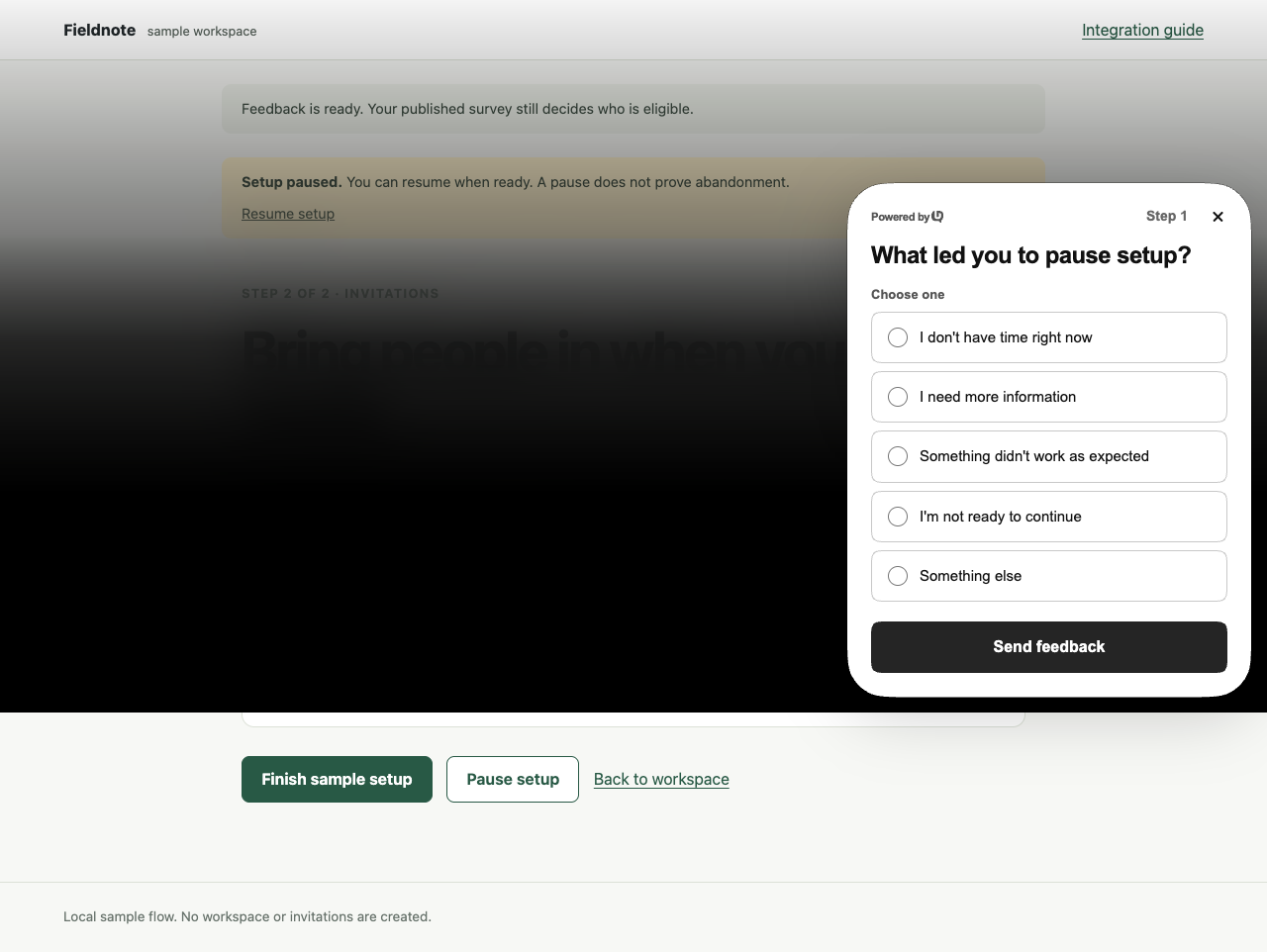
- Download the Next.js onboarding example →
A small App Router project with the integration and a survey recipe.
- Choose the onboarding question →
Read the timing, wording and interpretation behind this example.
Run the example with your own development site
Scroll horizontally to see all columns.
| Example dependency | Pinned version or requirement |
|---|---|
| UserReason browser SDK | @userreason/js 0.5.0 |
| Next.js | 16.4.2, App Router |
| React and React DOM | 19.3.1 |
| TypeScript | 7.0.2 |
| Node.js | 22.12 or newer |
| Public CLI used by this guide | @userreason/cli 0.1.1 |
| Recipe review date | 18 October 2026 |
Use the example’s package-lock.json for its exact dependency versions. Create or select a development site in the dashboard; keep test answers separate from your live product’s results.
unzip nextjs-onboarding.zip
cd nextjs-onboarding
cp .env.example .env.local
npm ci
npm run dev
Scroll horizontally to see all columns.
| Environment variable | What to put there |
|---|---|
| NEXT_PUBLIC_USERREASON_SITE_ID | The public UUID of your development site. An empty value leaves the sample integration disabled. |
| NEXT_PUBLIC_USERREASON_API_BASE_URL | Optional API origin. Leave unset for https://api.userreason.com; set it only when deliberately using another test API. |
Restart the development server after changing .env.local. NEXT_PUBLIC values are included in browser code: use the public site ID here, never a management token, CLI credential, signing secret or database URL. The site and API must belong to the same environment; a site created on dash-dev.userreason.com needs https://api-dev.userreason.com. If your site restricts allowed origins, allow the exact local origin used by the example.
- Create a site and connect the SDK →
The supported account, site and installation workflow.
Keep initialization at the client boundary
app/layout.tsx renders FeedbackProvider from app/feedback.tsx above the route tree. That client component initializes the shared SDK in a React effect rather than treating server rendering as visitor setup. Its cleanup destroys the instance and removes the SDK’s observers when the provider unmounts.
useEffect(() => {
  if (!configured) return;
  let active = true;
  try {
    userreason.init({
      siteId,
      storage: 'memory',
      automaticTriggers: false,
      ...(apiBaseUrl ? { apiBaseUrl } : {}),
    });
    void userreason.ready().then(
      () => { if (active) setStatus('ready'); },
      () => { if (active) setStatus('unavailable'); },
    );
  } catch {
    setStatus('unavailable');
  }
  return () => {
    active = false;
    userreason.destroy();
  };
}, []);
Keep this provider above the onboarding and review pages so client-side navigation does not tear down and recreate the integration. React’s development effect setup and cleanup can run more than once; the example keeps initialization and cleanup together for that reason. Do not call init() on every render or add another initializer to each page.
automaticTriggers is false because this example exercises one explicit event rather than page-load, selector or delay triggers. Explicit event() calls remain available. The excerpt sits inside the downloaded FeedbackProvider, which supplies the public configuration, status state and pause action; it is not a separate component to mount alongside that provider.
The example explicitly uses memory storage. That avoids persisting visitor state on the device, but it still makes network requests and sends reported events and answers. A full reload can create a fresh visitor, so choose your production storage and consent behavior deliberately.
- Next.js server and client components →
The framework’s client boundary and layout guidance.
- React effect lifecycle →
Effect setup, cleanup and development checks.
- Initialization and lifecycle →
Current init(), ready(), refresh() and destroy() behavior.
- Storage and consent →
Choose memory, local or cookie storage for your application.
- Identity and sign-out →
Add identity only when needed, and reset it when the account changes.
Publish a survey that listens for onboarding_paused
There are two supported paths: use the CLI to create a draft from the downloaded survey.json, or recreate the questions and conditions in the dashboard. The dashboard has no JSON-paste import control. Use the same site and API environment as the example in either path.
The commands below use the public CLI and explicit workspace and site IDs. Replace WORKSPACE_UUID and SITE_UUID with your IDs. For a site in the separate dash-dev.userreason.com environment, add --dev to each userreason command, including login, and set the sample API URL to https://api-dev.userreason.com.
npm install -g @userreason/cli@0.1.1
userreason login --open
userreason grant request --workspace WORKSPACE_UUID --site SITE_UUID --scope site:read --scope site:update --scope survey:write --scope campaign:publish --wait
Approve the printed grant URL. Register onboarding_paused on this site before using the recipe, especially for a registered-only event policy. If it already exists, inspect and reuse its definition instead of creating a duplicate. The download includes this event.json; its two properties match the application event.
{
  "event_key": "onboarding_paused",
  "properties": {
    "step": { "type": "string", "required": true },
    "flow_version": { "type": "string", "required": true }
  }
}userreason event create --workspace WORKSPACE_UUID --site SITE_UUID --file event.json --purpose business --json
userreason prompt create --workspace WORKSPACE_UUID --site SITE_UUID --file survey.json --jsonThe Business event preset is a collection choice for a low-volume explicit action when retained history is useful. It does not infer that someone abandoned onboarding. Triggering a survey and retaining business-event occurrences remain separate concerns.
Open links.edit from the create result and review the draft. Confirm onboarding_paused as the event trigger, flow_version equal to nextjs-onboarding-v1 as the event-property audience, 100% sampling, partial collection, and the conditional follow-up. The recipe allows at most one display per tracked visitor in its enrollment; site-wide limits still apply.
userreason prompt get PROMPT_UUID --workspace WORKSPACE_UUID --site SITE_UUID --jsonReplace PROMPT_UUID with the ID returned by create. Read the current revision from get and use it in place of CURRENT_REVISION below. Publish only after reviewing the draft; creating or saving it does not make it live.
userreason prompt publish PROMPT_UUID --workspace WORKSPACE_UUID --site SITE_UUID --revision CURRENT_REVISION --jsonTo use the dashboard instead, recreate the paired question recipe, event trigger, event-property audience and frequency settings in the survey editor, then review and publish there. After either path, reload the example, wait for Feedback is ready and choose Pause setup.
- Create, review and publish a survey →
Dashboard and CLI publication, permissions and revision handling.
- Audience, trigger and frequency rules →
Configure who can see the survey and when it can appear.
Verify the saved response, not just the open widget
- With the survey published, reload the example in a fresh test session. Wait for Feedback is ready, navigate to the review route through the app’s link, then choose Pause setup.
- Answer the first question. If the selected reason has a follow-up, advance, answer it or leave it empty, then submit.
- Open that survey’s Responses tab in the dashboard. Confirm that the saved answer and response status match what you submitted.
- With partial collection enabled, test a reason that shows the follow-up: advance past the first answer, then close before final submission. Check the Partial filter for the saved first answer.
- Repeat after a client-side route change to check the provider lifecycle. Use a fresh test visitor when frequency or prior completion correctly prevents another display.
Typing into a field does not save that edit by itself. Partial answers are saved when the visitor advances; the last answer finalizes the response. A shown notification, a fulfilled ready() call or a true event() result is not a substitute for checking the stored answer.
- Partial responses →
When answers are saved, what a partial means, and how to inspect one.
- SDK notifications →
Observe display and submission without replacing backend response checks.
When the survey does not appear or the answer is missing
Scroll horizontally to see all columns.
| What you see | What to check |
|---|---|
| No SDK requests | Set a valid public site UUID, restart Next.js after changing environment variables, and confirm the client provider mounts. An empty or invalid site ID intentionally disables this sample. |
| Connected, but no survey | Check the site, published version, exact onboarding_paused trigger, audience, sampling, frequency and workspace allowance. |
| Works on one route only | Keep the provider in the shared root layout. Do not destroy the instance in a page that unmounts during navigation. |
| A second pause does not trigger an event | The sample makes one event attempt per app visit. Reload for another test; production survey frequency rules also apply. |
| Origin or connection error | Use an allowed local origin and the intended API origin. Check ready() failures and SDK error notifications. |
| An expected partial is missing | Enable partial collection and advance past the answered question. Unsubmitted edits are not saved. |
| Monthly limit reached | Check Workspace response usage. New responses wait for the UTC monthly reset or a higher limit; an already-counted response can still finish. |
- Troubleshooting →
Work through connection, publication and delivery checks.
- Response allowance and pricing →
How the workspace allowance and monthly reset work.