
Engineering
How we test in-app surveys before shipping
A survey appearing on screen is only the start. We built a runnable example that checks the product event, every answer route and the saved response. Here is the test strategy—and the code you can adapt.
By UserReason · Updated · Read as Markdown
The result: 15 answer routes, three implementations
Our comparison asks one question with an owned form, UserReason’s native survey and PostHog’s native popover. It runs the real public SDK packages against local API fixtures. On each implementation, the browser checks all five answer choices, the optional follow-up and the saved response.
The useful result is a repeatable test, not a claim that one vendor is faster. You can change a question or integration and see which expectation breaks before asking your users for feedback.
Scroll horizontally to see all columns.
| Check | Passing behavior |
|---|---|
| Trigger and audience | Loading a page does not show the survey. An excluded user does not see it after the event. |
| Five answers per implementation | Three routes ask for optional detail; two finish immediately. |
| Partial and final saves | The first answer is present before completion. The final save uses the same response ID. |
| Optional detail | An omitted answer can complete; an entered answer reaches the local store. |
| Repeated action | The application guard prevents another display within that page. |
| Failed owned-form save | The answer remains available and the next attempt can succeed. |
| Browser isolation | No requests leave loopback; the page reports no runtime errors. |
Start with one explicit product moment
The sample asks what made someone pause onboarding. It does not infer abandonment from a timeout or treat every page view as a reason to interrupt. A person first chooses “Pause setup”; the app records that state, then offers optional feedback.
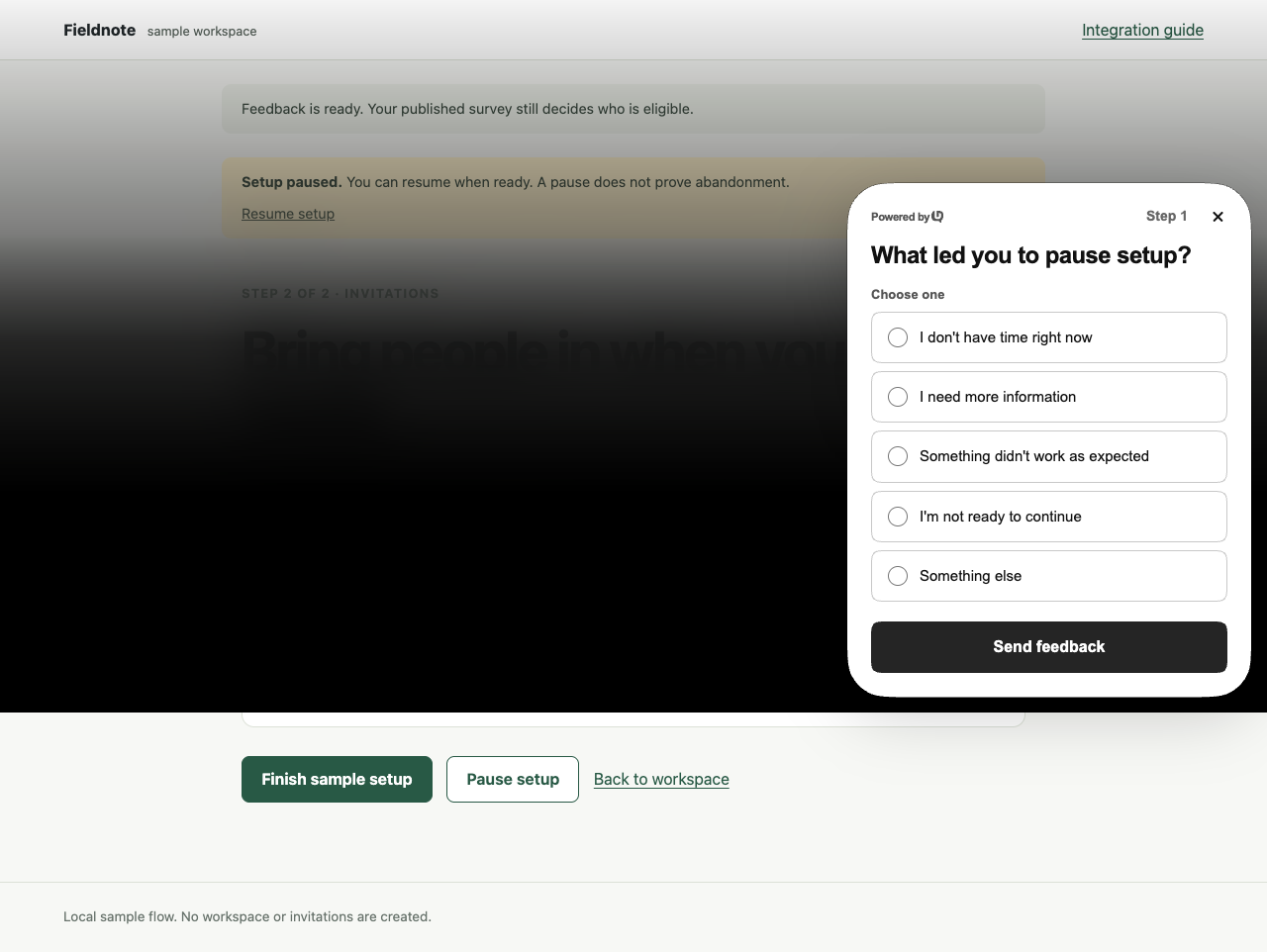
In the comparison, the application owns a small audience checkbox and a once-per-page guard shared by all three implementations. That makes the test conditions explicit. These guards do not establish either vendor’s server-side targeting or cross-session frequency behavior.
button.onclick = () => {
  document.querySelector('#result')!.textContent = 'Setup paused. You can return later.';
  if (offered || !document.querySelector<HTMLInputElement>('#eligible')!.checked) return;
  offered = true;
  void Promise.resolve().then(trigger).catch(() => { status.textContent = 'Feedback is unavailable. Setup is still paused.'; });
};
The practical rule: optional feedback should not undo the action the person just took. Our React cancellation example tests this more extensively, including pending and failed cancellation requests before a survey can appear.
- See the React cancellation example →
Keep feedback after the confirmed product action, with tests for pending, failed and duplicate requests.
Test the first saved answer, not only the thank-you screen
A person can choose a reason and leave before writing more. If the first save is missing, a polished thank-you screen will not reveal the problem. We inspect the local response store before moving beyond the follow-up question.
Scroll horizontally to see all columns.
| Moment | Expected record |
|---|---|
| A reason requiring detail is submitted | One response ID, the selected reason, completed=false. |
| The optional detail is submitted or omitted | The same response ID, completed=true. |
| A reason with no follow-up is submitted | One completed response without a detail step. |
| The owned-form completion is retried | One completed row, rather than a second response. |
The SDKs use different request formats, so the fixtures normalize their saved records for this assertion. We check that the final result has exactly one new row and that any partial save kept its ID.
if (partial) assert.equal(saved[0].response_id, partial.response_id, 'Partial and final must share one response ID');
assert.ok(JSON.stringify(saved[0]).includes(mode === 'posthog' ? option.label : option.id), 'The selected reason must reach the local store');
For the owned form, a separate endpoint test also checks invalid choices, oversized or hidden detail fields, a conflicting update and a final-to-partial regression. This is the behavior you take responsibility for when you maintain your own response endpoint.
Run the real renderer with a controlled API
A mock survey component would miss SDK lifecycle and rendering problems. Instead, the example imports the public SDKs and serves compatible configuration, session and response fixtures from its own Vite server. Each browser context starts clean and requests outside that origin are blocked.
That isolation makes the test repeatable and keeps synthetic answers out of customer projects. It is also a boundary: a fixture acknowledging a response is not proof that a production vendor stored it. Authentication, billing, production targeting and cross-session identity need separate integration checks.
PostHog uses a full local SDK bundle so optional scripts do not leave the test origin. Its fixture disables user-agent filtering to let an automated browser capture events. Keep normal filtering in a real project; do not use these bundles to compare download sizes or performance.
Run the same checks
Install Node.js 22.12 or later and Google Chrome, then download the example. It needs no vendor account or credentials. Original example code is MIT licensed; the SDKs and other dependencies keep their own licenses.
unzip feedback-comparison.zip
cd feedback-comparison
npm ci
npm run build
npm test
npm run dev
Inspect tests/browser.mjs for the answer-route checks, tests/api.test.mjs for the owned endpoint, src/main.ts for SDK setup, and local-api.mjs for every synthetic API reply. The README explains how to connect a real development site after trying the local version.
- Download the tested source →
Public SDKs, lockfile, MIT license, local fixtures and tests.
- Download checksum and file manifest →
Verify the archive and each included source file.
The verification record
Verified 2026-11-09 on macOS arm64, Node 23.11.0 and Google Chrome 156.0.8078.80. The run passed the endpoint test, all 15 browser answer routes and the owned-form retry scenario. External browser requests: 0.
Pinned packages: @userreason/js 0.5.0, posthog-js 1.438.12, Vite 7.3.7, TypeScript 7.0.2 and Playwright Core 1.63.0.
9e8a24761e5581ddd79efeff88654c6786cb6e1063a769cba0efa32714a811fa- Read the machine-readable verification record →
Commands, environment, expected checks, archive identity and limits. A build check rejects a record that no longer matches the archive.
This is UserReason’s engineering evidence, not an independent review or a customer outcome. The run does not establish production ingestion, authentication, billing, server-side eligibility, accessibility conformance or performance. An included CI workflow can repeat the browser tests on Ubuntu; its actual run result is separate from this recorded local run.
Use the pattern in your own app
- Choose an explicit product event and keep it independent of optional feedback.
- Test every answer route, including skipped optional answers and a failed save.
- Verify a real response in your development project before opening the survey to users.
- Check identity changes, repeat visits, permissions and your production delivery rules separately.
UserReason handles the managed survey workflow while you keep the product event and the decision you make from the answers. Start with one short question and 10,000 free monthly responses per workspace.
- Add UserReason to Next.js →
A complete path from setup to a saved response.
- Choose a feedback recipe →
Onboarding and cancellation questions you can adapt.
- Start free with UserReason →
Create a workspace and connect your application.